Valor 6800 1.0
Loading...
Searching...
No Matches
valor::Gamepad Class Reference

Wrapper class for XBox gamepads. More...

#include <Gamepad.h>

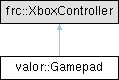
Inheritance diagram for valor::Gamepad:

Public Member Functions

 Gamepad (int id)
 Construct a new Valor Gamepad object.
 
void setDeadbandX (double deadband)
 Set the X deadband value.
 
void setDeadbandY (double deadband)
 Set the Y deadband value.
 
double leftStickX (int polynomial=1)
 Obtain the X value from the gamepad's left thumb stick.
 
double leftStickXFiltered (int polynomial=1)
 Obtain the X value from the gamepad's left thumb stick, with filtering applied.
 
bool leftStickXActive (int polynomial=1)
 Is the gamepad's left X thumb stick active?
 
double leftStickY (int polynomial=1)
 Obtain the Y value from the gamepad's left thumb stick.
 
double leftStickYFiltered (int polynomial=1)
 Obtain the Y value from the gamepad's left thumb stick, with filtering applied.
 
bool leftStickYActive (int polynomial=1)
 Is the gamepad's left Y thumb stick active?
 
double rightStickX (int polynomial=1)
 Obtain the X value from the gamepad's right thumb stick.
 
double rightStickXFiltered (int polynomial=1)
 Obtain the X value from the gamepad's right thumb stick, with filtering applied.
 
bool rightStickXActive (int polynomial=1)
 Is the gamepad's right X thumb stick active?
 
double rightStickY (int polynomial=1)
 Obtain the Y value from the gamepad's right thumb stick.
 
double rightStickYFiltered (int polynomial=1)
 Obtain the Y value from the gamepad's right thumb stick, with filtering applied.
 
bool rightStickYActive (int polynomial=1)
 Is the gamepad's right Y thumb stick active?
 
double rightTrigger ()
 Obtain the gamepad's right trigger value.
 
bool rightTriggerActive ()
 Is the gamepad's right trigger active?
 
double leftTrigger ()
 Obtain the gamepad's left trigger value.
 
bool leftTriggerActive ()
 Is the gamepad's left trigger active?
 
bool DPadUp ()
 Is the gamepad's D-pad up button pressed?
 
bool DPadDown ()
 Is the gamepad's D-pad down button pressed?
 
bool DPadLeft ()
 Is the gamepad's D-pad left button pressed?
 
bool DPadRight ()
 Is the gamepad's D-pad right button pressed?
 
bool getLeftStickButton ()
 Get the state of the left stick button.
 
bool getRightStickButton ()
 Get the state of the right stick button.
 
void setRumble (bool turnOn, double intensity=.25)
 Sets the rumble for the gamepad.
 
void setJoystickFilterCacheSize (int cacheSize)
 Sets the cache size for the joystick filters.
 
units::angle::radian_t getLeftStickAngle ()
 Gets the angle of the left joystick in a field-relative perspective.
 
units::angle::radian_t getRightStickAngle ()
 Gets the angle of the right joystick in a field-relative perspective.
 

Detailed Description

Wrapper class for XBox gamepads.

Used to enhance the default methods in the FRC XboxController class. Additional methods are needed to make gamepad utilization easier and cleaner in subsystem classes.

Focus on providing more resolution and functions for X/Y thumb-pads.

Constructor & Destructor Documentation

◆ Gamepad()

valor::Gamepad::Gamepad ( int id)
explicit

Construct a new Valor Gamepad object.

Parameters
idUSB ID that shows up on the driver station. Between 0 and 3

Member Function Documentation

◆ DPadDown()

bool valor::Gamepad::DPadDown ( )

Is the gamepad's D-pad down button pressed?

Returns
true Gamepad's down d-pad button is pressed
true Gamepad's down d-pad button is not pressed

◆ DPadLeft()

bool valor::Gamepad::DPadLeft ( )

Is the gamepad's D-pad left button pressed?

Returns
true Gamepad's left d-pad button is pressed
true Gamepad's left d-pad button is not pressed

◆ DPadRight()

bool valor::Gamepad::DPadRight ( )

Is the gamepad's D-pad right button pressed?

Returns
true Gamepad's right d-pad button is pressed
true Gamepad's right d-pad button is not pressed

◆ DPadUp()

bool valor::Gamepad::DPadUp ( )

Is the gamepad's D-pad up button pressed?

Returns
true Gamepad's up d-pad button is pressed
true Gamepad's up d-pad button is not pressed

◆ getLeftStickAngle()

units::angle::radian_t valor::Gamepad::getLeftStickAngle ( )

Gets the angle of the left joystick in a field-relative perspective.

The angle is calculated using the filtered X and Y values of the left stick. 0 radians points away from the driver station (forward), and the angle increases counter-clockwise.

Returns
units::angle::radian_t The angle of the left joystick in radians.

◆ getLeftStickButton()

bool valor::Gamepad::getLeftStickButton ( )

Get the state of the left stick button.

Returns
true if the left stick button is pressed.
false if the left stick button is not pressed.

◆ getRightStickAngle()

units::angle::radian_t valor::Gamepad::getRightStickAngle ( )

Gets the angle of the right joystick in a field-relative perspective.

The angle is calculated using the filtered X and Y values of the right stick. 0 radians points away from the driver station (forward), and the angle increases counter-clockwise.

Returns
units::angle::radian_t The angle of the right joystick in radians.

◆ getRightStickButton()

bool valor::Gamepad::getRightStickButton ( )

Get the state of the right stick button.

Returns
true if the right stick button is pressed.
false if the right stick button is not pressed.

◆ leftStickX()

double valor::Gamepad::leftStickX ( int polynomial = 1)

Obtain the X value from the gamepad's left thumb stick.

First, the gamepad's raw X value is compared against the set deadband. See the setDeadbandX function. If the input is inside the deadband, the output is set to 0. Otherwise, the gamepad's raw X value is raised to the power of the input polynomial. For example, if polynomial parameter is 2, then the input is squared (x^2).

Parameters
polynomialWhat to raise the input to the power of
Returns
double X value of the gamepad's left thumb stick. Between -1 and 1

◆ leftStickXActive()

bool valor::Gamepad::leftStickXActive ( int polynomial = 1)

Is the gamepad's left X thumb stick active?

Parameters
polynomialThe exponent to apply to the gamepad's stick value
Returns
true Gamepad's left X thumb stick is outside of deadband
false Gamepad's left X thumb stick is at rest and within deadband

◆ leftStickXFiltered()

double valor::Gamepad::leftStickXFiltered ( int polynomial = 1)

Obtain the X value from the gamepad's left thumb stick, with filtering applied.

This method first calls leftStickX() to get the raw (deadband-applied, polynomial-adjusted) value, then applies a linear filter (moving average) to smooth out the input.

Parameters
polynomialWhat to raise the input to the power of. Defaults to 1.
Returns
double Filtered X value of the gamepad's left thumb stick. Between -1 and 1.

◆ leftStickY()

double valor::Gamepad::leftStickY ( int polynomial = 1)

Obtain the Y value from the gamepad's left thumb stick.

First, the gamepad's raw Y value is compared against the set deadband. See the setDeadbandY function. If the input is inside the deadband, the output is set to 0. Otherwise, the gamepad's raw Y value is raised to the power of the input polynomial. For example, if polynomial parameter is 2, then the input is squared (x^2).

Parameters
polynomialThe exponent to apply to the gamepad's stick value
Returns
double Y value of the gamepad's left thumb stick. Between -1 and 1

◆ leftStickYActive()

bool valor::Gamepad::leftStickYActive ( int polynomial = 1)

Is the gamepad's left Y thumb stick active?

Parameters
polynomialThe exponent to apply to the gamepad's stick value
Returns
true Gamepad's left Y thumb stick is outside of deadband
false Gamepad's left Y thumb stick is at rest and within deadband

◆ leftStickYFiltered()

double valor::Gamepad::leftStickYFiltered ( int polynomial = 1)

Obtain the Y value from the gamepad's left thumb stick, with filtering applied.

This method first calls leftStickY() to get the raw (deadband-applied, polynomial-adjusted) value, then applies a linear filter (moving average) to smooth out the input.

Parameters
polynomialThe exponent to apply to the gamepad's stick value. Defaults to 1.
Returns
double Filtered Y value of the gamepad's left thumb stick. Between -1 and 1.

◆ leftTrigger()

double valor::Gamepad::leftTrigger ( )

Obtain the gamepad's left trigger value.

Returns
double Gamepad's left trigger value. Between 0 and 1

◆ leftTriggerActive()

bool valor::Gamepad::leftTriggerActive ( )

Is the gamepad's left trigger active?

Returns
true Gamepad's left trigger is pressed to some degree
false Gamepad's left trigger is at rest

◆ rightStickX()

double valor::Gamepad::rightStickX ( int polynomial = 1)

Obtain the X value from the gamepad's right thumb stick.

First, the gamepad's raw X value is compared against the set deadband. See the setDeadbandX function. If the input is inside the deadband, the output is set to 0. Otherwise, the gamepad's raw X value is raised to the power of the input polynomial. For example, if polynomial parameter is 2, then the input is squared (x^2).

Parameters
polynomialWhat to raise the input to the power of
Returns
double X value of the gamepad's right thumb stick. Between -1 and 1

◆ rightStickXActive()

bool valor::Gamepad::rightStickXActive ( int polynomial = 1)

Is the gamepad's right X thumb stick active?

Parameters
polynomialThe exponent to apply to the gamepad's stick value
Returns
true Gamepad's right X thumb stick is outside of deadband
false Gamepad's right X thumb stick is at rest and within deadband

◆ rightStickXFiltered()

double valor::Gamepad::rightStickXFiltered ( int polynomial = 1)

Obtain the X value from the gamepad's right thumb stick, with filtering applied.

This method first calls rightStickX() to get the raw (deadband-applied, polynomial-adjusted) value, then applies a linear filter (moving average) to smooth out the input.

Parameters
polynomialWhat to raise the input to the power of. Defaults to 1.
Returns
double Filtered X value of the gamepad's right thumb stick. Between -1 and 1.

◆ rightStickY()

double valor::Gamepad::rightStickY ( int polynomial = 1)

Obtain the Y value from the gamepad's right thumb stick.

First, the gamepad's raw Y value is compared against the set deadband. See the setDeadbandY function. If the input is inside the deadband, the output is set to 0. Otherwise, the gamepad's raw Y value is raised to the power of the input polynomial. For example, if polynomial parameter is 2, then the input is squared (x^2).

Parameters
polynomialThe exponent to apply to the gamepad's stick value
Returns
double Y value of the gamepad's right thumb stick. Between -1 and 1

◆ rightStickYActive()

bool valor::Gamepad::rightStickYActive ( int polynomial = 1)

Is the gamepad's right Y thumb stick active?

Parameters
polynomialThe exponent to apply to the gamepad's stick value
Returns
true Gamepad's right Y thumb stick is outside of deadband
false Gamepad's right Y thumb stick is at rest and within deadband

◆ rightStickYFiltered()

double valor::Gamepad::rightStickYFiltered ( int polynomial = 1)

Obtain the Y value from the gamepad's right thumb stick, with filtering applied.

This method first calls rightStickY() to get the raw (deadband-applied, polynomial-adjusted) value, then applies a linear filter (moving average) to smooth out the input.

Parameters
polynomialThe exponent to apply to the gamepad's stick value. Defaults to 1.
Returns
double Filtered Y value of the gamepad's right thumb stick. Between -1 and 1.

◆ rightTrigger()

double valor::Gamepad::rightTrigger ( )

Obtain the gamepad's right trigger value.

Returns
double Gamepad's right trigger value. Between 0 and 1

◆ rightTriggerActive()

bool valor::Gamepad::rightTriggerActive ( )

Is the gamepad's right trigger active?

Returns
true Gamepad's right trigger is pressed to some degree
false Gamepad's right trigger is at rest

◆ setDeadbandX()

void valor::Gamepad::setDeadbandX ( double deadband)

Set the X deadband value.

Deadband is the range of values where where the values can be varied without changing the output response.

For example, if the deadband is 0.1, then any values between -0.1 and 0.1 will all yield an output response of 0.

Parameters
deadbandDeadband value for the X direction of the gamepad. Between 0 and 1

◆ setDeadbandY()

void valor::Gamepad::setDeadbandY ( double deadband)

Set the Y deadband value.

Deadband is the range of values where where the values can be varied without changing the output response.

For example, if the deadband is 0.1, then any values between -0.1 and 0.1 will all yield an output response of 0.

Parameters
deadbandDeadband value for the Y direction of the gamepad. Between 0 and 1

◆ setJoystickFilterCacheSize()

void valor::Gamepad::setJoystickFilterCacheSize ( int cacheSize)

Sets the cache size for the joystick filters.

This determines the number of samples used in the moving average filter for joystick inputs. A larger cache size results in smoother, but more delayed, input.

Parameters
cacheSizeThe size of the cache for the moving average filter.

◆ setRumble()

void valor::Gamepad::setRumble ( bool turnOn,
double intensity = .25 )

Sets the rumble for the gamepad.

Parameters
turnOnWhether to turn rumble on or off.
intensityThe intensity of the rumble, between 0.0 and 1.0. Defaults to 0.25.

The documentation for this class was generated from the following file: